Custom chimes and announcements
The catalogue is a starting point, not a ceiling. Every licensed site can upload two chimes of its own and have the speakers say whatever you type.
Both are included with the driver licence. There is nothing extra to buy, no second key to enter, and no subscription.
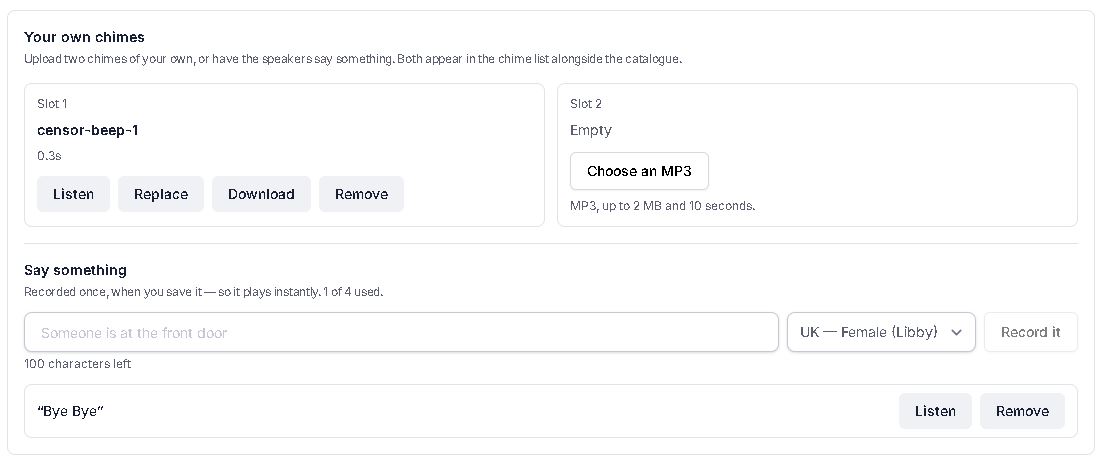
Upload your own chime
Two slots per licence. Drop an MP3 into either one from the setup app.
| Requirement | |
|---|---|
| Format | MP3 |
| Size | Up to 2 MB |
| Length | Up to 10 seconds |
Worth knowing up front, so you can prepare the right file rather than discovering it by rejection:
- MP3 only. We check the file itself, not its name — renaming a WAV to
.mp3will not get past it, and the app will tell you so plainly. - Ten seconds is our limit, not Sonos's. A doorbell that talks for a minute is a doorbell nobody keeps. If you need something longer, it probably wants to be a playlist rather than a chime.
- The slots belong to the licence, not the processor. Replace or re-image the processor and your chimes are still there.
Uploading to a slot that is already full replaces what was in it.
Have the speaker say something
Type up to 100 characters, choose a voice, and preview it before you commit.
"Someone is at the front door" "The back gate has opened" "The alarm is now armed"
Four voices are available — UK and US, male and female. A site can keep four announcements at a time, so the front door, the back gate and the alarm can each sound different. Assign any of them to as many of your ten chimes as you like.
Reached four and need another? Remove one you are not using — a removed announcement is genuinely deleted, so its place is freed at once.
Recorded once, plays instantly
An announcement is recorded once, when you save it — not spoken afresh each time the doorbell rings. From that moment it is simply an audio file like any other chime: it plays instantly, with no delay at the moment it matters.
Saving an announcement you already have does not use one of your four — it is simply remembered. (A different voice, though, is a different announcement, so four voices of the same sentence would use all four slots.)
Use your own URL
You can also point a chime at any public https:// MP3 you host yourself (the URL can be up to 500
characters). Useful if you already have an audio library — and it is your permanent escape hatch. See
Service lifetime and your audio.
What the homeowner sees
Nothing changes. A custom chime and a spoken announcement appear on the driver's tile in the Crestron Home app exactly like any other chime, and fire from any scene, schedule or event.